


How our In-House Legal Team Uses Harvey to Work Smarter
Our in-house lawyers are using Harvey’s latest capabilities to strengthen operational excellence and scale legal support.
A lot has changed since we published our blog on How Harvey Uses Harvey, so it felt like a good time to revisit the topic.
Since last year, our company has grown from about 200 people to nearly 500. In addition to San Francisco, New York, and London, we’ve opened offices in Sydney and Toronto (with India on deck). We’ve also seen tremendous growth in our customer base: We now work with more than 700 customers, Harvey is used by over 50% of the AmLaw 100, and we’re seeing strong adoption across EMEA and Australia. Most importantly, we’ve shipped a significant number of new features and workflows across the Harvey platform.
In this post, I’ll highlight some of the key platform updates and share how our in-house Legal team has adapted our day-to-day habits to take advantage of them.
Workflow Builder: Speeding up Vendor Reviews
Early this year we introduced Workflow Builder, which allows users to create their own agentic processes that leverage the power of Harvey’s AI. Each workflow consists of linked steps and each step consists of one of four types of blocks: user input, AI action, logic, or output. Creators then link these steps together to build their workflows.
To date, our customers have built over 15K custom workflows and our own team has built out dozens of workflows to help automate certain repetitive tasks.
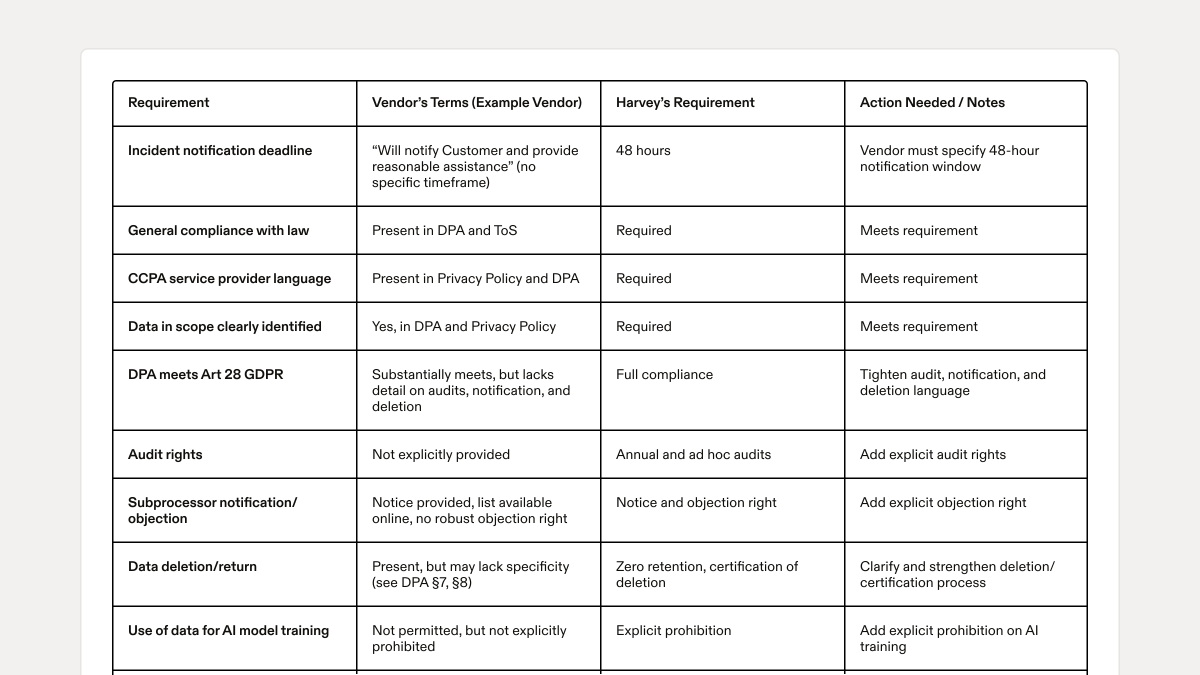
For example, our Privacy team uses a custom workflow to speed up vendor onboarding reviews. With Harvey, they enter the vendor’s name, the engagement purpose, and the type of personal information shared with the vendor, then upload the relevant privacy and security documentation. Harvey returns a concise summary of the key terms and a side‑by‑side table mapping our requirements to the vendor’s commitments — covering incident notification timelines, international data transfers, data use permissions, data in scope, data retention, and other core privacy and security obligations. This way, the team can quickly spot alignment and gaps before moving forward.
Most notably, every finding is validated against the source documents, and final decisions remain human‑led. The workflow operates within our existing security and privacy controls, accelerating review without expanding risk. Here’s a closer look at the step-by-step:
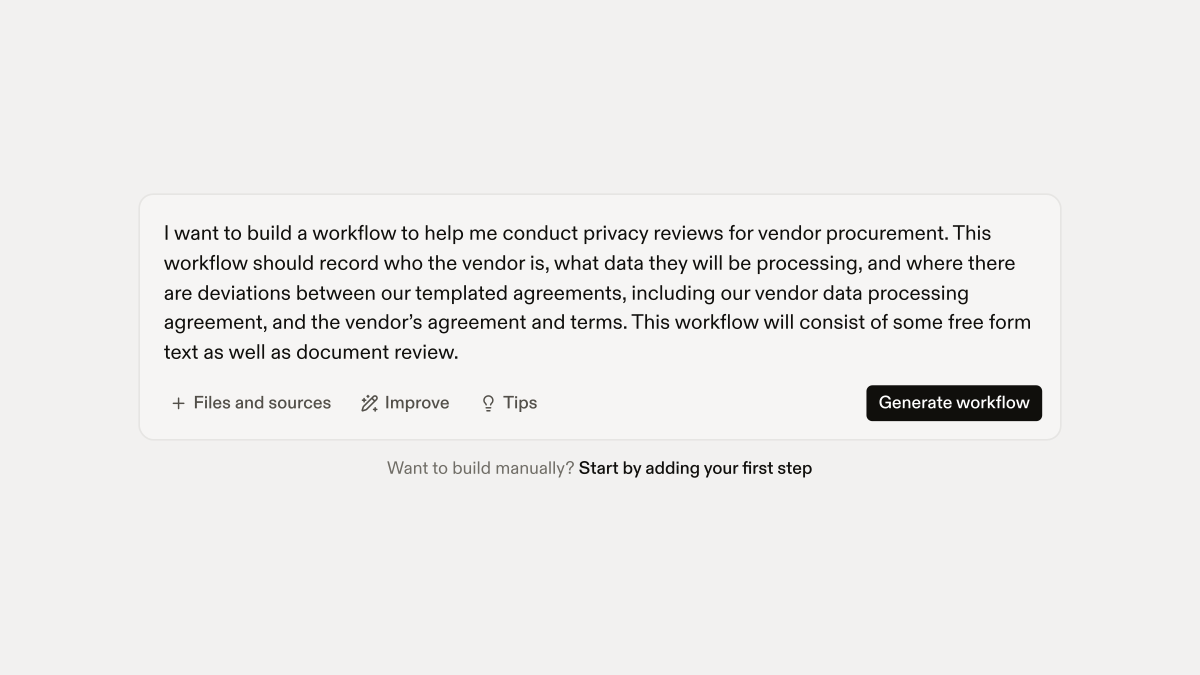
Workflow Builder starts with an initial prompt. Below is an example that Cory, our Senior Privacy and AI Program Manager, used to get started on this workflow:
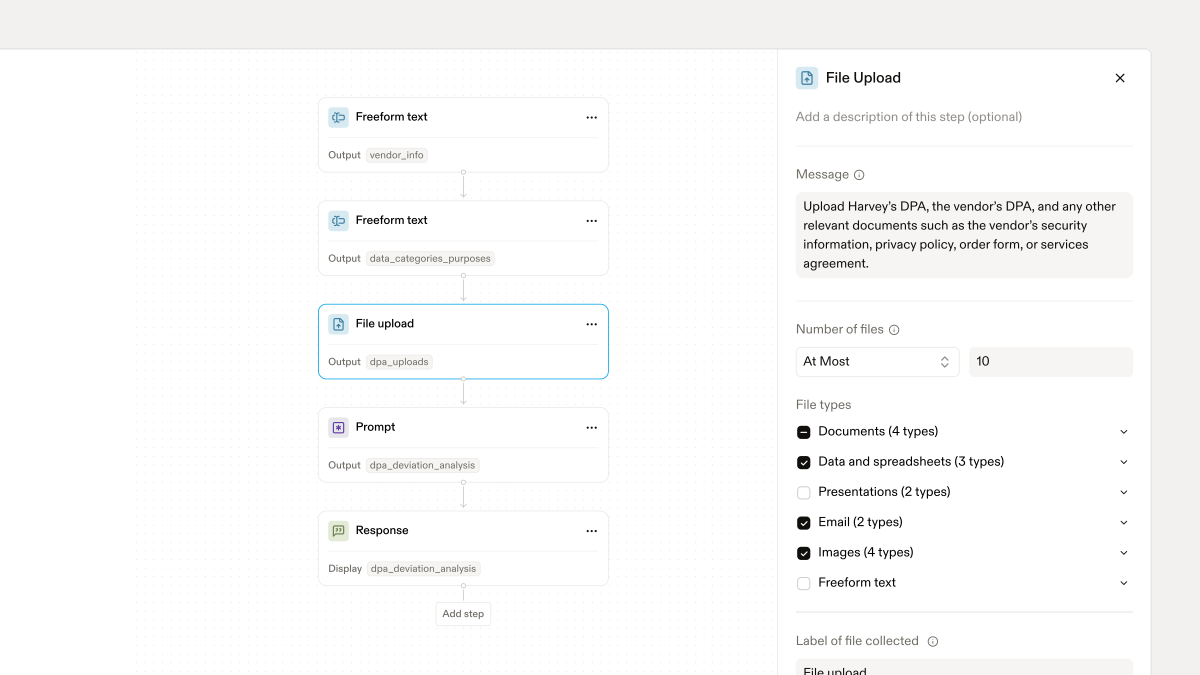
As the creator, Cory then further refined the actual steps of the workflow:
Once the workflow was finalized, Harvey’s output looks like this:
It took Cory about an hour to create and finetune this workflow, saving his team at least 4-6 hours every week.
Our Privacy team is brought in to assist on any procurement project which potentially involves personal information — which is to say that they are brought in on a lot of procurement projects. We estimate that this workflow saves us an average of at least 2-3 hours of work for each such engagement.
Harvey for Word Add-In: Faster Redlining Based on Playbooks
Like any other company, lawyers on our Legal team absolutely live inside Microsoft Word. This is especially true of our Commercial Legal team that deals with legal negotiations with our prospective customers.
As a multi-tenant system, it isn’t realistic for us to customize our Product Agreements, Security Addendum, or Data Protection Agreements (DPAs) or to utilize our customers’ stock agreements, so we generally try to steer our customer engagements to use “our paper.” That being said, we fully appreciate that our customers have their own issues and concerns, especially those who operate in highly regulated industries, and we need to be able to make accommodations. This means that we sometimes get redlines to our agreements.
A few months ago, we released the latest version of the Harvey for Word Add-In, which brings Harvey to work right inside Microsoft Word. Our Engineering, Product, and Design (EPD) team has been on a tear in releasing a lot of new features that our own Legal team has been excited to put into practice.
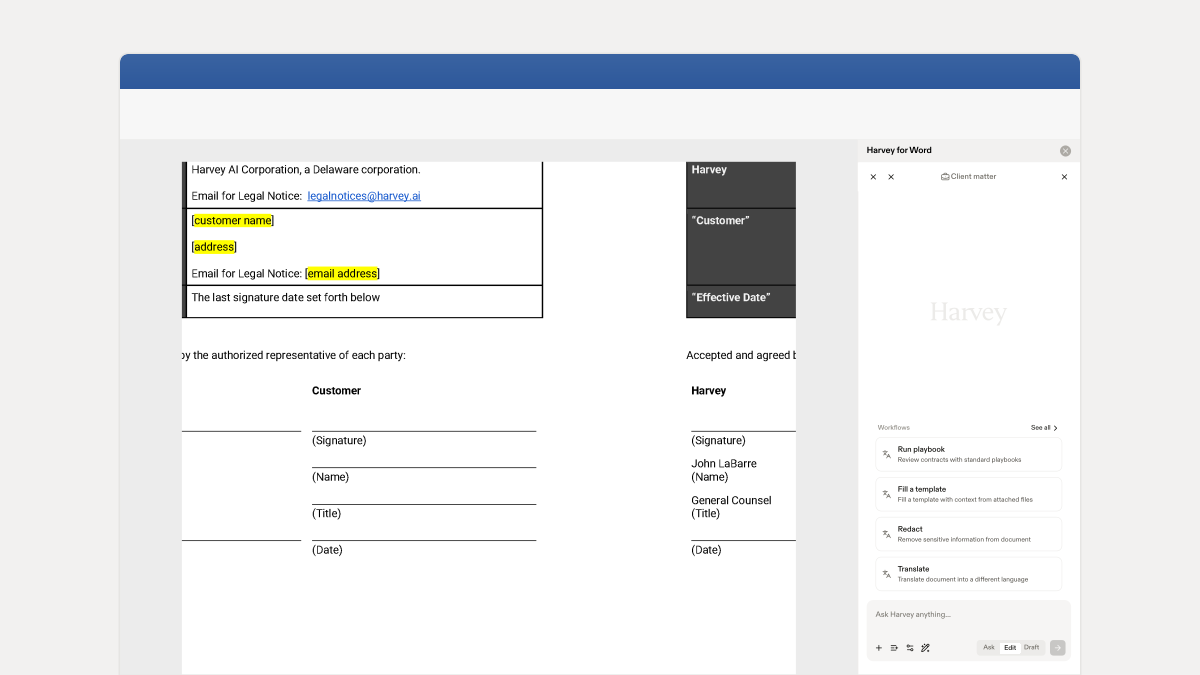
One of the most powerful use cases the Harvey for Word Add-In enables is that we can take our team’s commercial playbook (the document where we capture our thoughts on acceptable fallbacks, standard messaging to our customers about why we can’t agree to certain things, etc.) and have Harvey apply it and propose further redlines as appropriate. When a customer sends us redlines, we can use Harvey right from within Word and generate responsive redlines automatically based on our playbook. Harvey will even draft comment bubbles to help explain our position.
The below image shows what this looks like for using Harvey inside Word to propose redlines to an NDA.
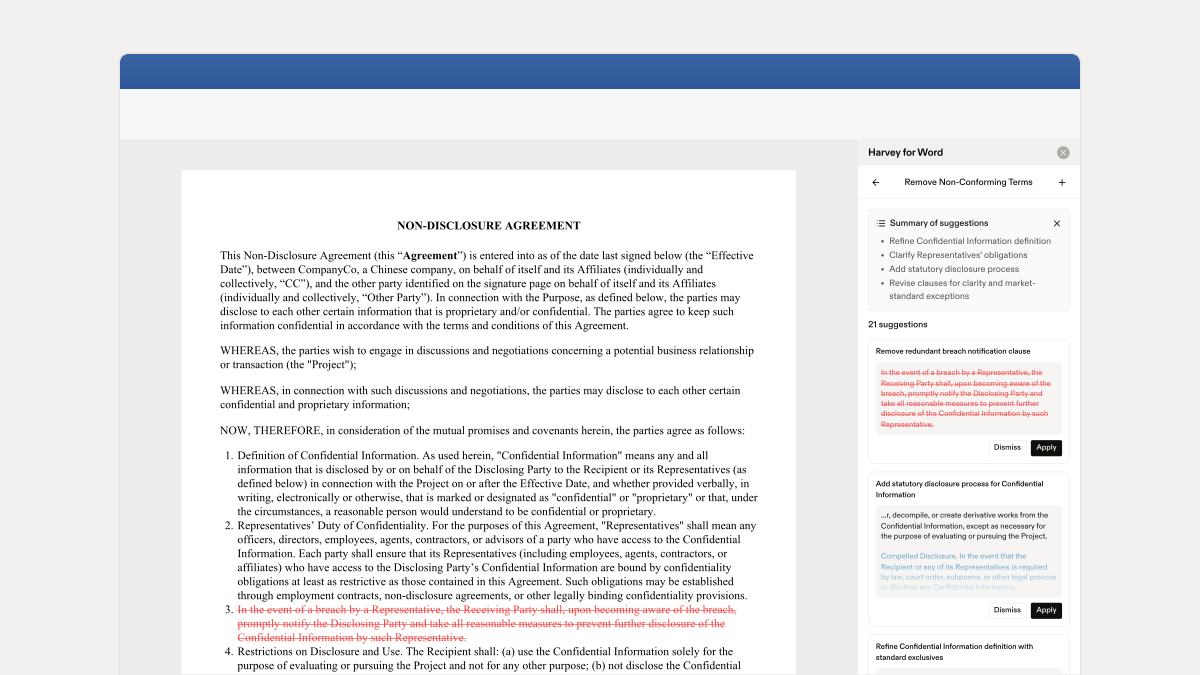
Each change and proposed edit remains firmly at the control of our lawyers, but we can save an incredible amount of time by utilizing the power of Harvey directly inside Word. By using our own playbooks, Harvey is grounded in our risk tolerances, our acceptable language, and our logic. And since more than 95% of redlines are things we’ve seen before, Harvey enables our team to quickly and efficiently resolve or revise customer redlines based on our playbooks. This frees our commercial lawyers to focus on the redlines of first impression.
In the past, I could confidently say that Harvey lawyers used Harvey regularly (at least several times a day). Now, with the latest version of the Harvey for Word Add-In, our Commercial Legal team uses Harvey on nearly every single commercial matter that we work on, and many of our attorneys spend hours every day working side-by-side with Harvey. It has had a tremendous impact on our productivity, and frankly, there is a lot more to come.
Vault: Data Extraction Across Large Document Sets
Last year, I wrote about Vault and how it delivers some of the greatest efficiencies for Harvey’s Legal team. With all the changes that have happened in the last year, it’s nice to see that some things haven’t changed: Vault continues to shine and helps save us incredible amounts of time.
Vault is the best place to go when we have a large corpus of documents from which we need to extract data (whether it be finding a needle in a haystack or extracting the same kind of data across hundreds or thousands of documents). Recently, we changed the document limit from 10,000 documents to 100,000 documents, making Vault even more useful for larger organizations.
A great example of how we used Vault recently relates to the Digital Operational Resilience Act (DORA), an EU regulation for financial entities to strengthen their digital security. DORA requires financial entities to implement risk management, report incidents, conduct testing, and ensure that their ICT service providers maintain robust security and risk management practices. DORA has some very specific requirements that the in-scope EU companies must ensure their relevant third-party providers adhere to, and, accordingly, we started to get more frequent questions from our EU customers.
Sally, our Head of EMEA Legal, took our standard commercial contracts (our Platform Agreement, Security Addendum, DPA, etc.) and created a small Vault. She then prompted Harvey:
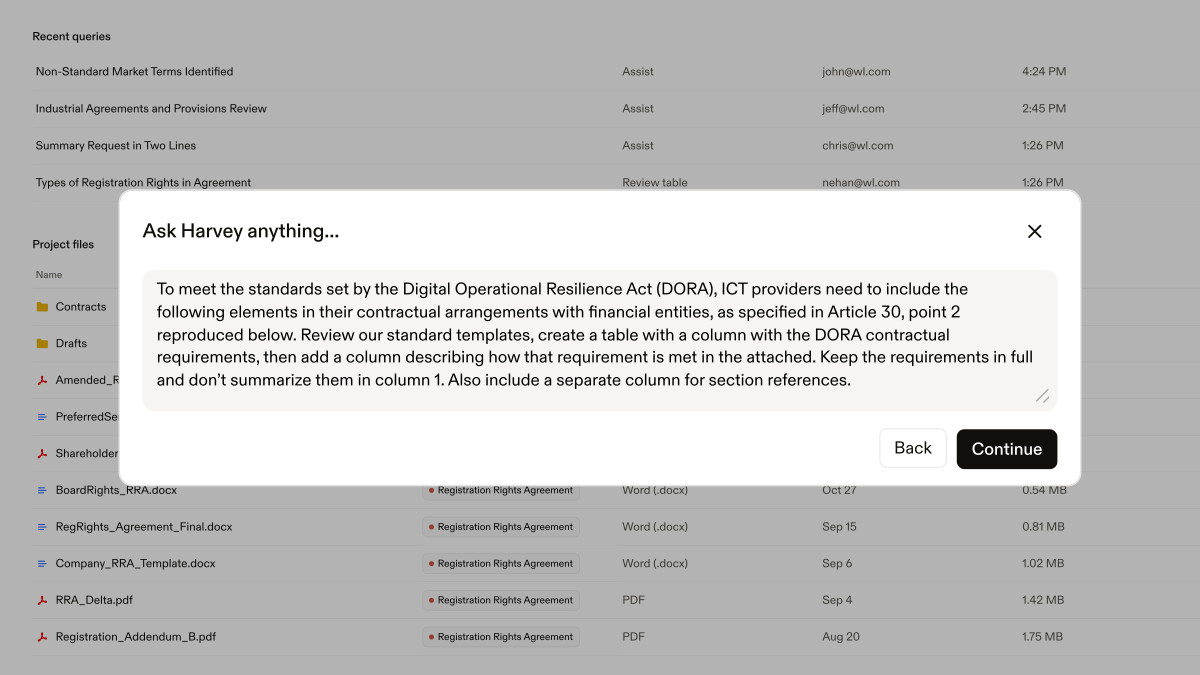
And she received the following output:
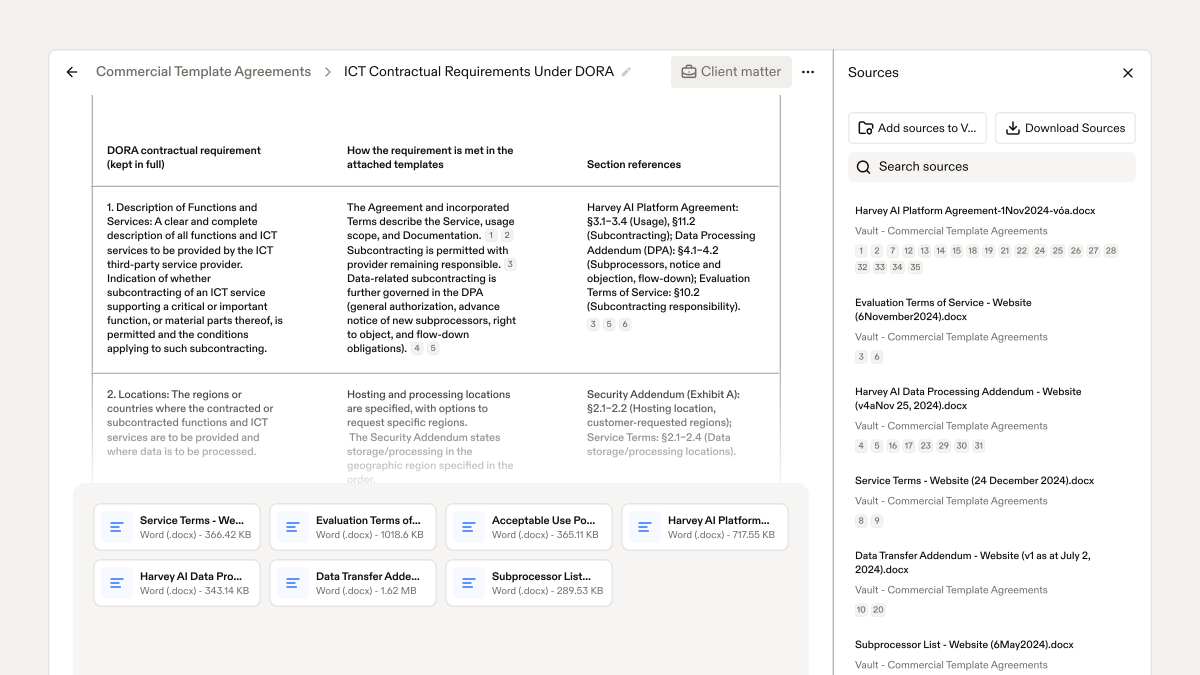
She verified the results by using the source notes to help her quickly identify the specific language Harvey was referencing. Then, she exported the results to Word, where she refined the formatting. Now, we have a great piece of collateral that shows how each of the DORA-required third-party ICT service provider provisions are memorialized in our commercial paper. We use this collateral any time one of our potential customers asks us about DORA, and it helps demonstrate how we are contractually compliant.
Using Harvey, a project that usually takes over five hours took just under two hours to complete and we now have a defined piece of collateral that we can use to support this conversation whenever it comes up in the future.
Honorable Mentions: Tools for Better Prompting and Results
One relatively small, but incredibly useful feature we added to the platform was our Improve button, where Harvey uses its AI to improve your prompt before you even submit your query. It can help take your “colloquial” prompt and turn it into something much more likely to get you the results you are looking for.
Internally, we call this feature “the magic prompt” and, candidly, I wish we called it that in our production version of Harvey; it really is magic. Let’s walk through a quick example.
Here is my (not particularly helpful) prompt:
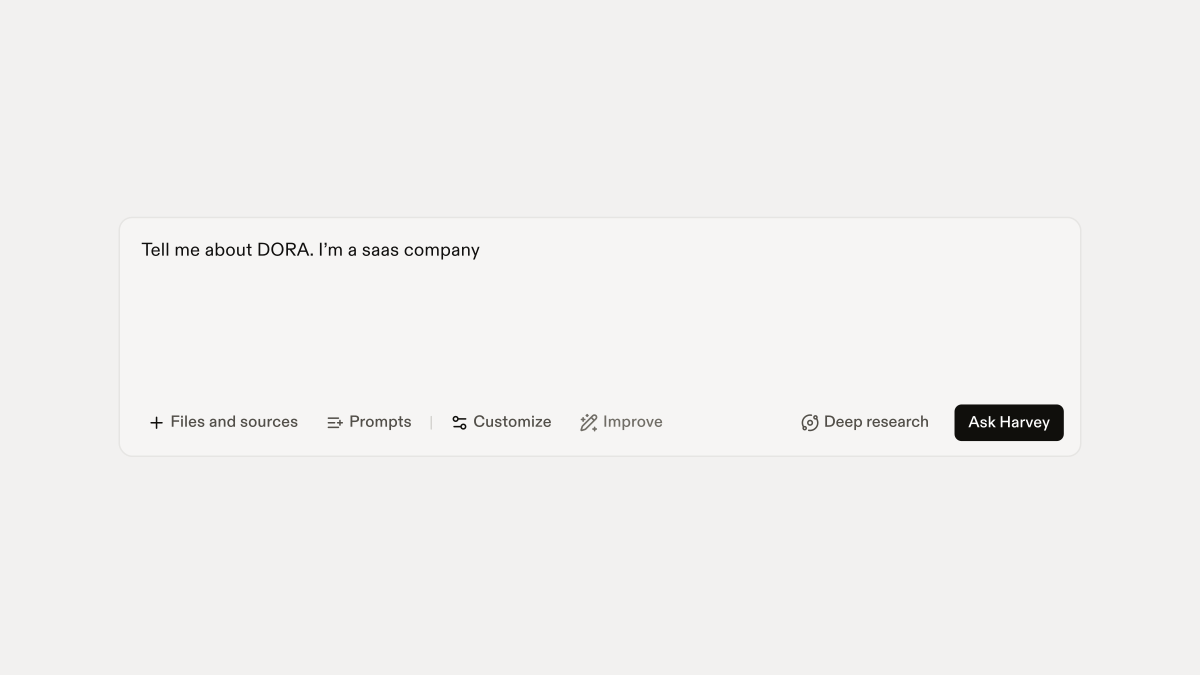
And here is my prompt after hitting the Improve button:
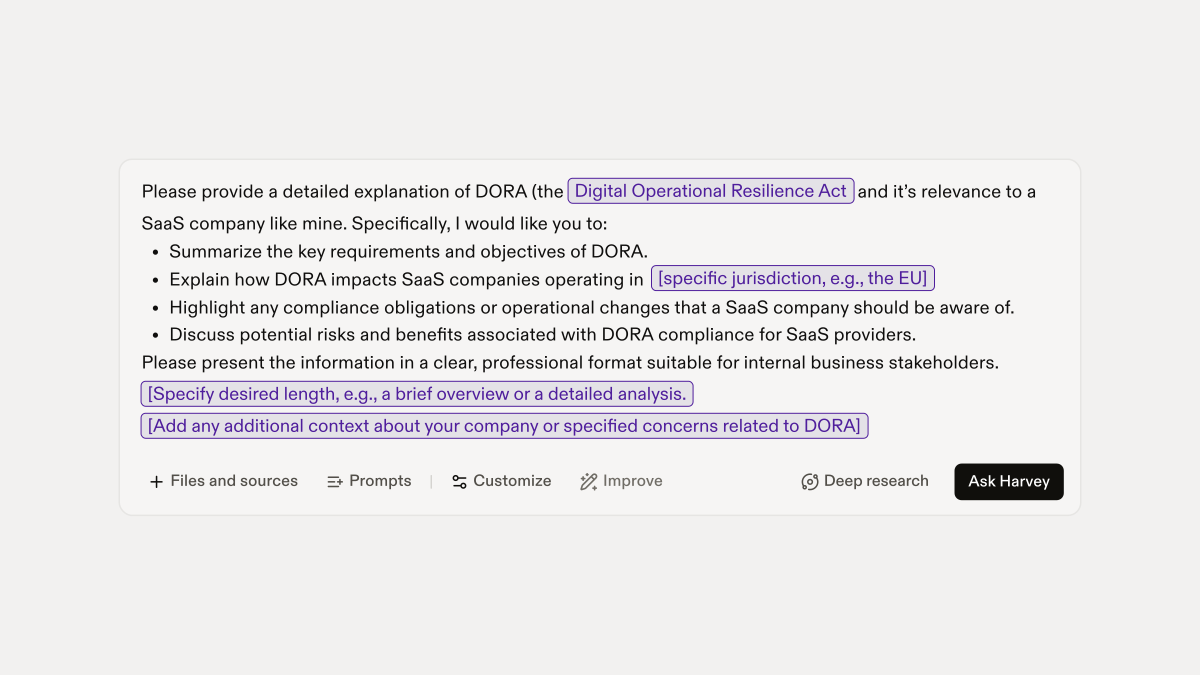
Not only does using the Improve button yield better results the first time around, it has also helped me become a better prompter in the first instance.
Related to the Improve feature is the “nudge” feature. If Harvey assesses your prompt and determines that your query would benefit from one of our many knowledge sources, Harvey now gives you a nudge in the potentially better direction.
As an example, here is a very basic prompt:
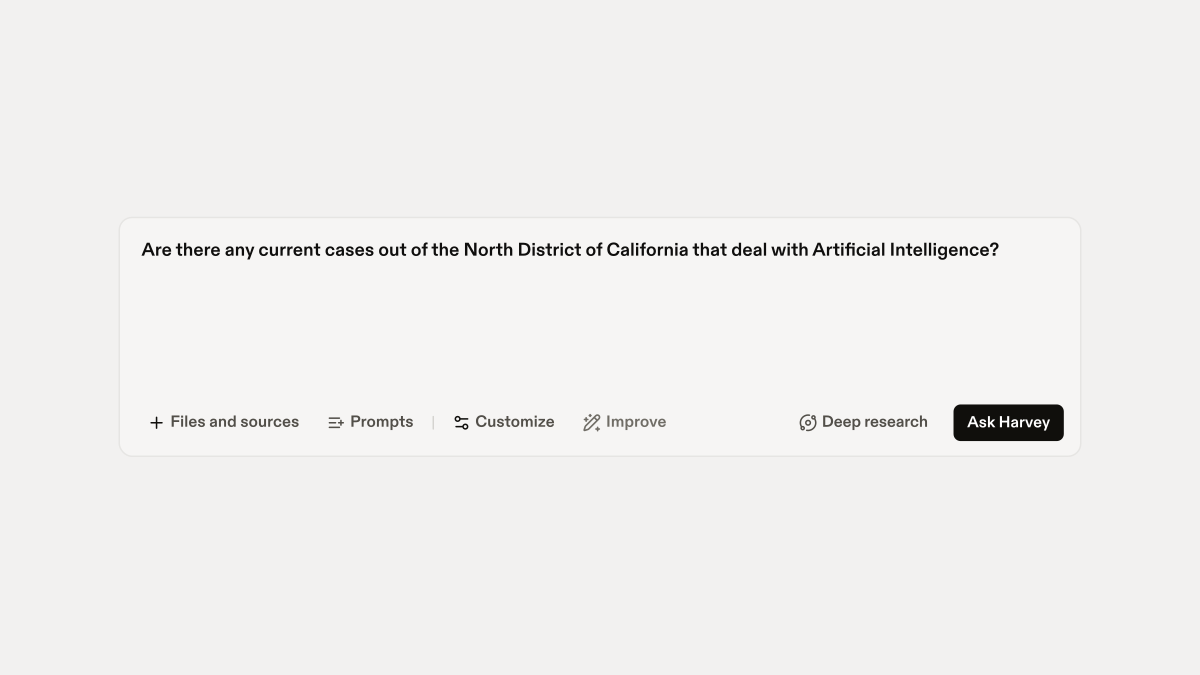
Harvey recognizes that it could probably do a better job answering this question utilizing either our Web Search knowledge source or LexisNexis integration. While the LexisNexis integration is not a free option for customers (it’s a paid add-on), it is a great companion resource for certain kinds of work.
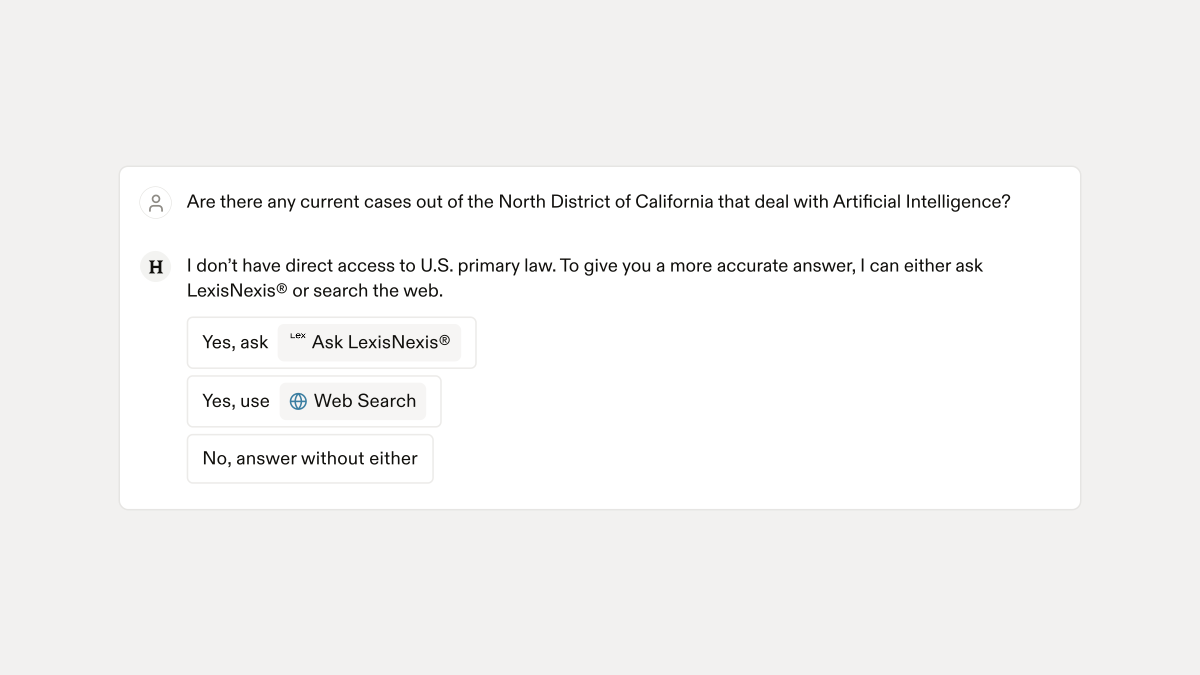
Here, I’ve selected the LexisNexis knowledge source and Harvey has come back with some relevant cases (and, if I click on the sources, I’m deeplinked right into LexisNexis to review the full text of the cited cases).
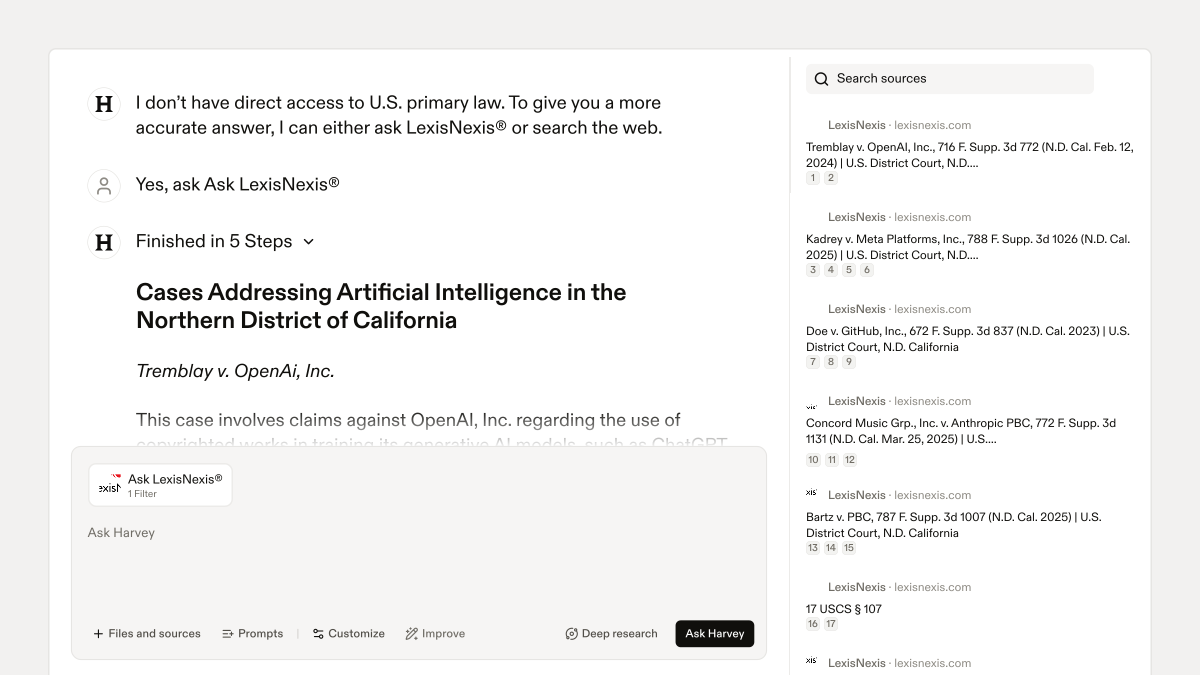
In short, this feature nudges the user to intelligently anchor Harvey to relevant and authoritative sources, helping to ensure its responses are reliably grounded, no matter how the question is initially framed.
Our In-House Customers are Working Smarter With Harvey, too
It’s not just us — our in-house customers have seen notable impact from using Harvey, too. Here are a few examples:
- Deutsche Telekom implemented Harvey across its German Legal, Compliance, and Data Protection departments and estimates that Harvey helps reclaim an estimated five hours of attorney time per user per week. Their use cases include litigation support, public tenders, and regulatory compliance.
- The Adecco Group’s lawyers report saving up to eight hours per week on routine work with Harvey. In one case, lawyers used Harvey to model litigation strategies by comparing their case with historical rulings — enhancing accuracy and preparedness.
- Repsol, one of the world’s leading energy producers, notes how its 200-person Legal team gets value from Harvey. They have 96% Harvey adoption across their Legal department, and they estimate that they save four to six hours per lawyer per week (up from about three hours saved during their early pilot with Harvey).
The most common advice I give customers when they ask about how to roll out AI tools is that organizations need to do more than just provide the tools. They need to identify use cases, mandate that these tools be used, and set expectations around how and on what folks are expected to be using AI. If you leave these choices to chance, your team will still see some benefit and efficiencies from using tools like Harvey, but it’s really only when you get your entire department moving in a consistent direction that you begin to see material and measurable returns on your investment.
And remember, tools like Harvey are not meant to replace lawyers; rather they are meant to enhance them. Check out our recent benchmark results showing that lawyers working in combination with Harvey outperform by 5% on reviewing contracts and producing structured, analytical data (compared to performing the task by themselves or entirely relying on LLMs for such work).
Looking Ahead to 2026
Our Engineering and Product teams have introduced over 120 new features in Harvey so far this calendar year. The roadmap for 2026 is looking even more ambitious, and I’m confident that our platform will continue to help legal teams work smarter in an increasingly complex landscape. Spoiler alert: If you’ve been looking to start using Harvey to collaborate with folks outside your organization (like your outside counsel), things are about to get even more interesting. . .
Last updated:


