


Building a Faster, More Reliable Upload Experience in Vault
How presigned URLs, async pipelines, and defensive fallback made Vault uploads faster and more reliable at scale.
Over the past few months, Vault has become one of Harvey’s most heavily used surfaces as legal teams increasingly rely on it as their central system for AI-powered file work. Weekly upload volume climbed from 2.2 million files per week in mid-January to 15 million files per week in May, while Vault crossed 200 million active files this week. The first 100 million took roughly two years; the second 100 million took just two months.
After working to scale Vault’s file upload and management last fall, this recent growth in usage made us rethink how we can scale these capabilities even further. That forced us back to the central architecture question behind large-scale uploads: should Harvey’s backend continue carrying every file byte, or should it coordinate uploads while storage handles the transfer?
Presigned URL uploads are the gold-standard answer to the classic file-upload system design question: keep your application server on the control plane, and keep file bytes on the data plane. In the clean whiteboard version, the backend authorizes the upload and returns a short-lived Azure Blob Storage URL, the browser uploads directly to storage, and the backend finalizes the file record afterward. It’s almost suspiciously simple. But at Vault scale, the hard part was making that diagram survive production.
Throughout the rest of this post, we walk through how we split the upload control plane from the data plane, turned the browser into a concurrent upload pipeline, and hardened the new path for real enterprise environments.
The Problem With Server-Proxied Uploads
At some point, every engineer gets asked the sacred system design prompt: “Design Google Drive.” The expected answer usually appears pretty quickly: Do not send gigabytes of customer files through your application servers if object storage can receive them directly. Vault’s original upload path optimized for speed of development, simple validation, and a single backend-controlled flow that was easy to reason about. That was the right tradeoff when uploads were smaller and the product surface was moving quickly. As Vault adoption grew, the same simplicity became the bottleneck we needed to redesign.
In the previous architecture, every file uploaded to Vault was proxied through Harvey’s backend. The browser sent files to our servers, the backend validated the request, wrote the bytes to Azure, created file records, updated progress state, and kicked off downstream processing. This was straightforward to reason about because the backend controlled the full transaction, but it also meant the backend sat directly in the data path for every byte.
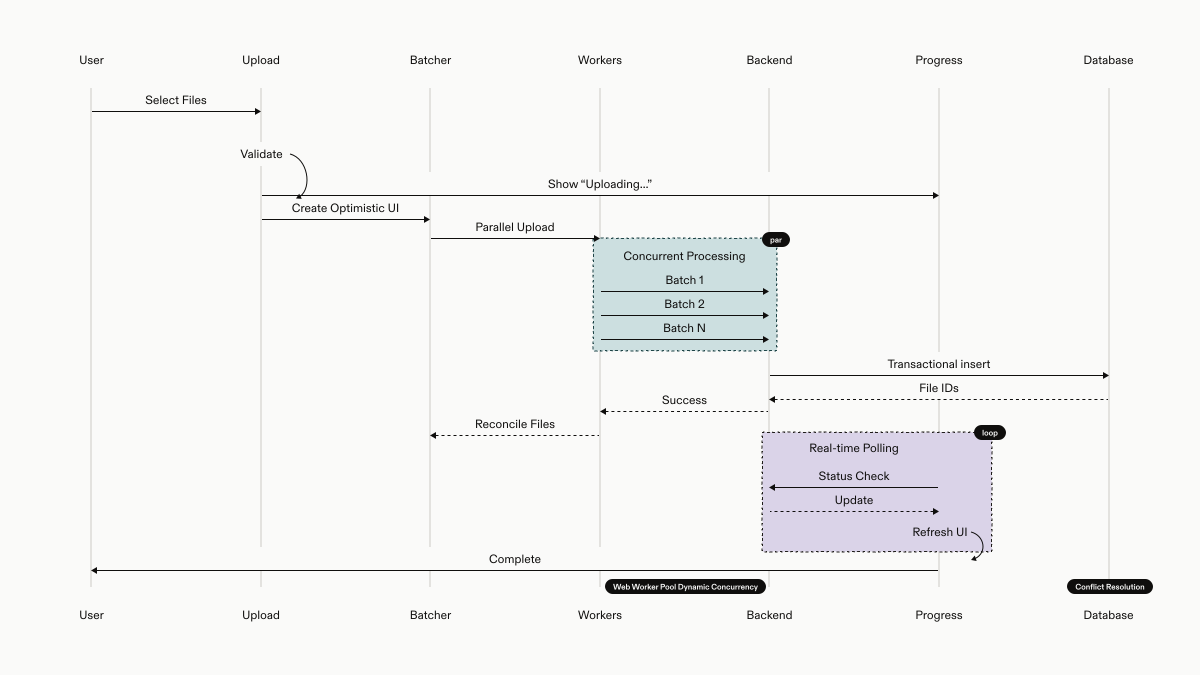
That created three scaling problems:
- Backend in the data path: Every byte traveled from browser → backend → Azure instead of browser → Azure. That added latency and made upload throughput depend on backend network, CPU, disk I/O, worker capacity, and egress instead of letting object storage receive the bytes directly.
- Long-lived upload work competing with normal traffic: Large uploads held backend connections and workers open for the full transfer duration, competing with ordinary API requests, progress polling, and downstream upload coordination.
- Fragile retries at batch scale: If a pod restarted, a request timed out, or a connection dropped mid-transfer, the user often had to retry from scratch. For customers uploading matter folders, data-room exports, or tens of thousands of files, that turned one infrastructure hiccup into a slow and uncertain upload experience.
For smaller Vaults, this tradeoff was acceptable. In the previous version of Vault scaling, we supported up to 10,000 files per vault, and the legacy architecture was simple enough to serve that world well. But newer usage patterns looked very different: legal teams were uploading matter folders, exports, archives, and DMS-scale batches. Upload performance became bounded less by the customer’s connection to storage and more by how much long-running file-transfer work the backend could absorb. The architecture made the backend responsible for both the control plane and the data plane, and those two jobs needed to be split apart.
Cutting out the Middleman
The obvious system design answer was also the right one: stop sending file bytes through the application server.
We moved Vault uploads to a presigned URL architecture. Instead of proxying file contents through Harvey’s backend, the backend now issues short-lived Azure SAS URLs that grant the browser direct, time-limited write access to Blob Storage. The backend still owns the control plane: permissions, validation, duplicate handling, file records, and processing orchestration. But the data plane moves out of the backend entirely.
At a high level, the upload becomes a three-step handshake:
- Init: The browser sends file metadata to the backend: names, sizes, content types, folder targets, duplicate mode, and batch ID. The backend validates access, creates WAITING_FOR_UPLOAD file records, generates SAS URLs, and returns one upload target per accepted file.
- Upload: The browser uploads file bytes directly to Azure Blob Storage using those SAS URLs. The backend is no longer sitting in the transfer path, so large files and large batches do not consume backend worker capacity for the duration of the upload.
- Finalize: The browser tells the backend which file IDs finished uploading. The backend verifies that the corresponding blobs exist, transitions the file records into the uploaded state, and kicks off downstream document processing.
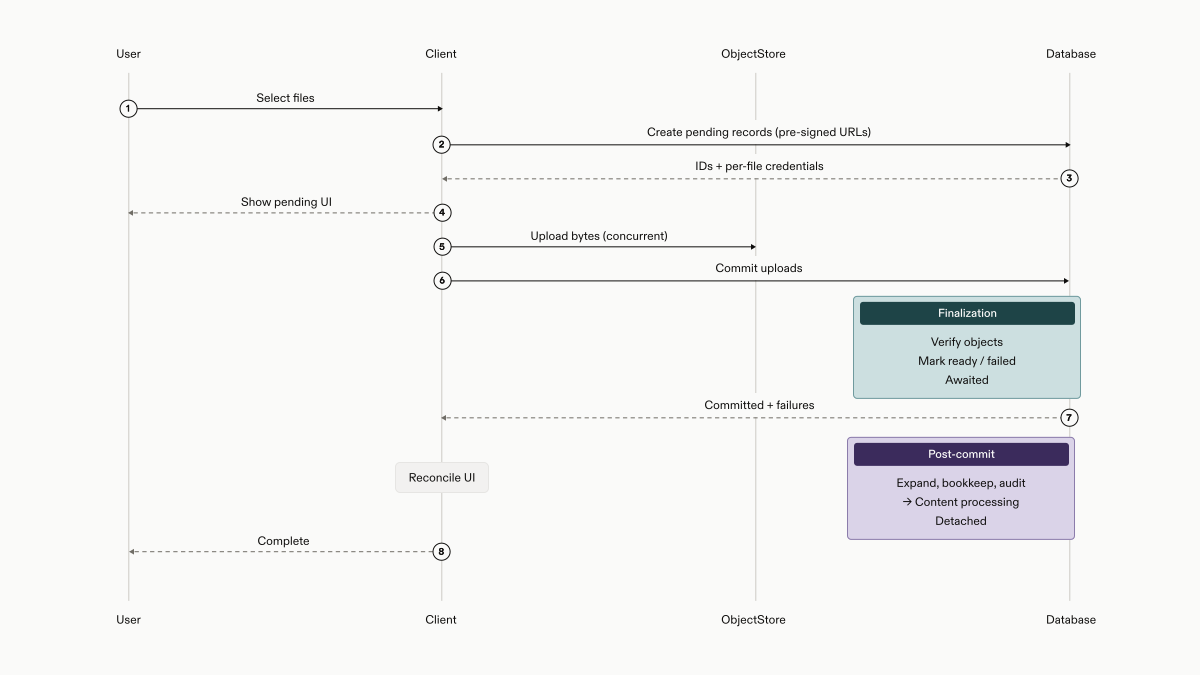
The clean version fits on a whiteboard. The production version required a lot more machinery: the frontend had to become a concurrent upload orchestrator, and the backend had to make initialization and finalization safe, batched, idempotent, and observable. That is where most of the engineering work lived.
Frontend: A Three-Stage Concurrent Pipeline
Once the backend stopped proxying file bytes, the frontend inherited a new job: it was no longer just submitting a form. It had to orchestrate a distributed upload across the browser, Harvey’s backend, and Azure Blob Storage.
The simplest implementation would be sequential:
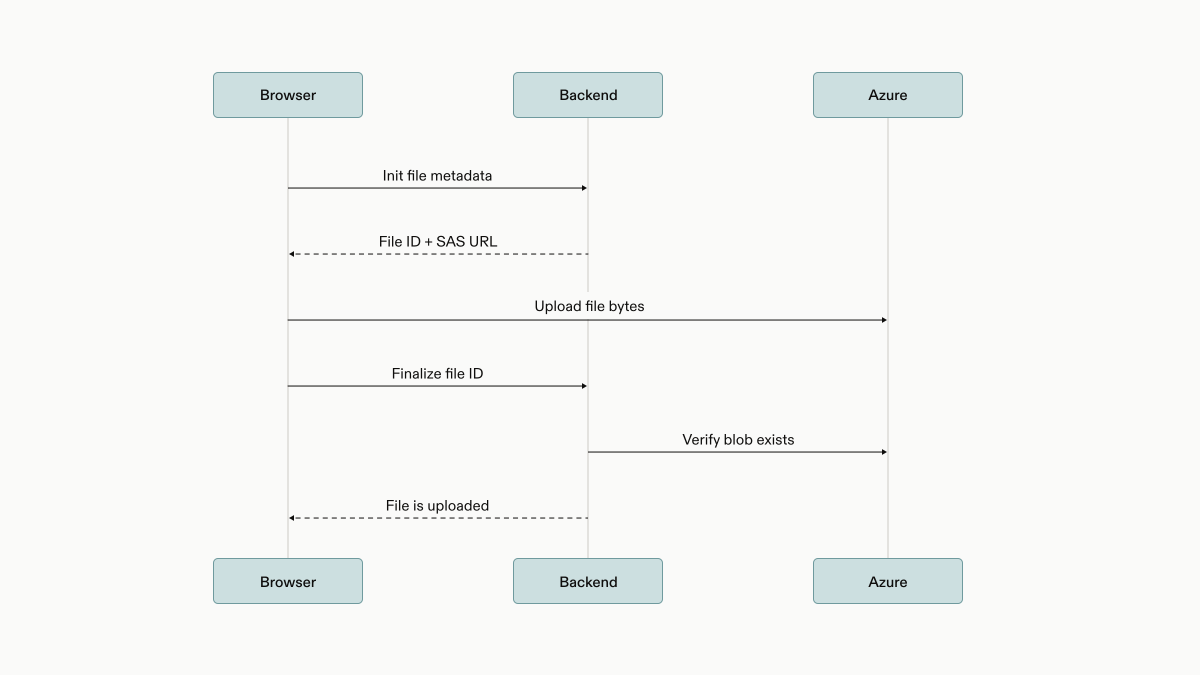
For one file, that works beautifully. For 50,000 files, it falls apart.
We could initialize all 50,000 files up front, but then the first upload waits for every SAS URL to come back. We could upload everything with Promise.all, but asking the browser to juggle 50,000 promises, file reads, network requests, and Azure SDK calls is not a strategy so much as a cry for help. We could finalize only after every upload completes, but then early files sit idle instead of moving into processing.
What we needed was an assembly line. The frontend pipeline has three concurrent stages connected by lightweight async queues:
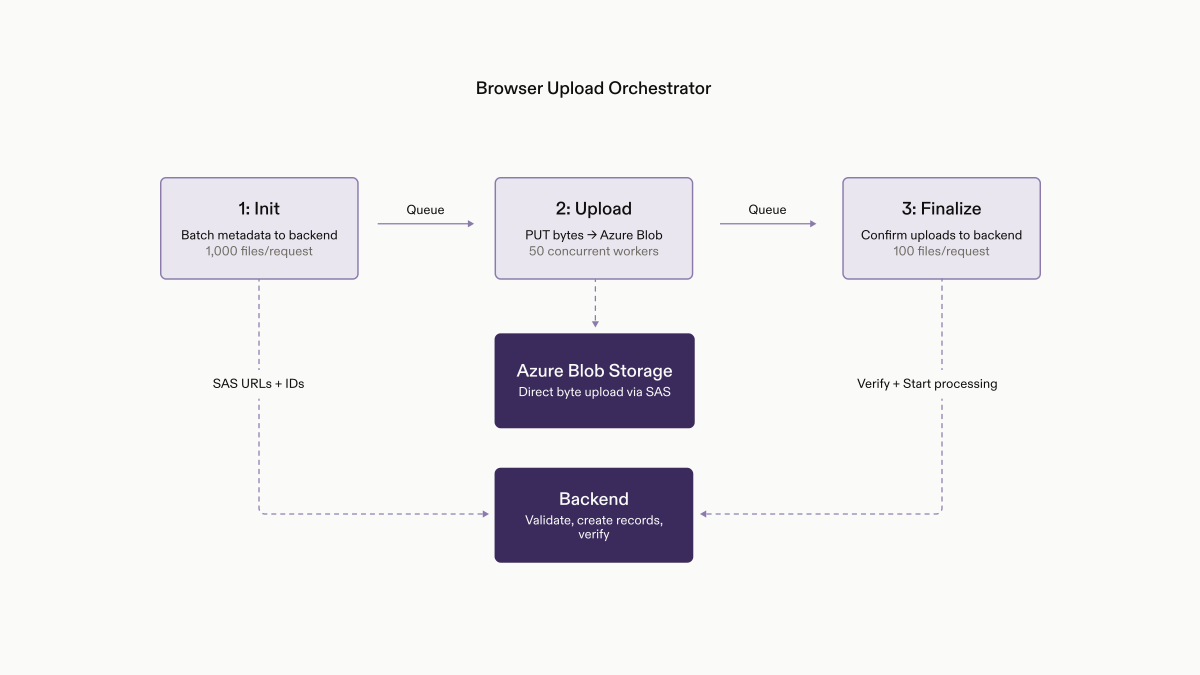
All three stages run concurrently in the browser. The first stage sends file metadata to the backend in batches and starts forwarding files as soon as their upload URLs are ready. The second stage uploads those files directly to Azure with controlled concurrency, so the browser can move quickly without overwhelming the user’s machine or network. The third stage tells the backend which uploads completed, again in batches, so successfully uploaded files can move into processing without waiting for the entire upload set to finish.
That means a 50,000-file upload no longer behaves like one giant request. It behaves more like a streaming pipeline: while one batch is being prepared, another can already be uploading, and earlier successful files can start finalizing while later files are still in flight.
We also had to make failure handling part of the pipeline itself. Different failures need different responses: a file that can’t be read from the user’s machine is very different from a temporary network issue, and both are different from a backend validation failure. By classifying failures as they happen, we can show clearer errors, retry only the cases that are safe to retry, and avoid turning one bad file into a confusing failure for the entire batch.
Backend: Keep the Control Plane Fast
Moving bytes out of the backend did not make the backend less important. It made its job more precise: authorize the upload, prepare storage targets, create durable file records, enforce duplicate behavior, verify completed uploads, and start processing.
The key was making that control plane scale in batches instead of per file. The initialization call can prepare up to 1,000 files at a time, which turns what could have been thousands of small backend round trips into a much smaller number of larger, more efficient operations. A few optimizations made the difference:
Batched initialization: The backend prepares upload targets in groups instead of file by file. It reuses Azure authorization material across the batch, generates short-lived upload URLs, and creates pending file records in bulk. That keeps backend round trips low even when a user uploads thousands of files.
Bulk duplicate handling: Vault uploads often include files whose names already exist. Instead of checking each filename individually, the backend resolves duplicate behavior for the whole batch at once, using database indexes designed for fast “Does this active file already exist?” lookups.
Tight transaction boundaries: The backend avoids holding database transactions open while waiting on cloud calls or expensive reads. Storage paths and upload URLs are prepared first; then the database transaction stays small and focused on the durable file-record writes.
The backend’s role shifted from “carry every byte” to “coordinate the lifecycle.” That distinction is what made the architecture scale; the browser and Azure handle high-volume data transfer, while the backend remains the source of truth for correctness.
Making Direct Uploads Production-Safe
Moving bytes out of the backend solved the core scaling problem, but it introduced a new reliability problem: the browser, Azure, and backend now had to coordinate a distributed upload across real customer environments.
Protecting the Browser and Network
Once the browser became responsible for moving file bytes, upload concurrency had to be controlled carefully. Large batches could not turn into thousands of simultaneous file reads, network requests, and Azure SDK operations.
The frontend pipeline limits both file-level concurrency and total bytes in flight. Large files are uploaded in blocks, with retry behavior handled at the transfer layer, so transient failures do not force users to restart from zero. Finalization is also adaptive: completed files are batched, but partial batches flush on a timer so small files can move into processing while larger tail uploads are still running.
Preserving Backend Correctness
Direct upload does not mean the browser decides that a file exists. The backend still owns permissions, validation, duplicate handling, file records, audit behavior, retention state, and processing orchestration.
After the browser uploads bytes to Azure, the backend verifies each blob before marking the file as uploaded. Pending records that never receive bytes are expired by a scheduled cleanup job, so abandoned sessions do not linger in Vault. Post-upload work then continues through Temporal, which gives archive extraction, bookkeeping, audit and retention updates, and document processing handoff durable retry boundaries outside the request path.
Surviving Enterprise Environments
The clean version of presigned uploads assumes the browser can reach Azure Blob Storage directly. Enterprise environments do not always allow that. Customers upload from managed laptops, VPNs, virtual desktops, corporate proxies, firewalls, and DLP tools that can block or modify direct storage requests.
Before using the presigned path, the browser runs a lightweight connectivity probe with the same Azure client as the real upload flow. If the probe fails, Vault falls back to the legacy server-proxied path before the user starts uploading. Stage-level observability across file reads, initialization, Azure upload, probing, verification, finalization, and processing handoff let us tell customer-network issues apart from application bugs and roll the migration out safely.
Results
Presigned URLs are a well-known pattern for making uploads faster, but the real question for us was: How much faster does this make Vault in practice, across real customer-like workloads?
One pattern worth calling out is that presigned uploads improved both the common case and the one off cases, but in different ways.
Metric | Before | After | Improvement |
|---|---|---|---|
Average upload latency | 6.7s | 5.9s | 13% faster |
P90 upload latency | 10.5s | 8.6s | 18% faster |
P95 upload latency | 20.6s | 16.2s | 21% faster |
P99 upload latency | 1m 25s | 1m 2s | 27% faster |
For everyday uploads, the improvement is steady across the latency curve: average latency dropped from 6.7s to 5.9s, and P99 dropped from 1m 25s to 1m 02s. That means the upload flow feels a bit faster for most users, but more importantly, the worst uploads are less likely to stretch into multi-minute uncertainty.
Metric | Before | After | Improvement |
|---|---|---|---|
Average duration | 2m 35s | 1m 6s | 57% faster |
P90 duration | 6m 55s | 2m 59s | 57% faster |
P95 duration | 7m 57s | 4m 17s | 46% faster |
P99 duration | 13m 22s | 6m 15s | 53% faster |
The biggest gains show up in heavier workloads. For 1,000-file uploads, average duration dropped from 2m 35s to 1m 06s, and P99 dropped from 13m 22s to 6m 15s. That points to the presigned pipeline doing what we wanted for many-small-file workloads: reducing per-file overhead from metadata preparation, backend round trips, and finalization.
Metric | Before | After | Improvement |
|---|---|---|---|
Average duration | 1m 17s | 50s | 35% faster |
P90 duration | 2m 52s | 1m 53s | 34% faster |
P95 duration | 4m 32s | 2m 55s | 36% faster |
P99 duration | 11m 38s | 6m 8s | 47% faster |
Large-file uploads improved too, with average duration dropping from 1m 17s to 50s and P99 dropping from 11m 38s to 6m 08s. That suggests the direct-to-Azure path and controlled concurrency are helping with sustained transfer throughput, while also reducing the long-tail cases caused by backend proxying or retries from byte zero.
In other words, presigned uploads don’t just make Vault uploads faster on average. They make the slowest, most confidence-eroding uploads meaningfully less painful.
Beyond Just Faster Uploads
Presigned uploads started as a familiar system design pattern: move file bytes out of the backend and let object storage do what object storage is good at. The hard part was making that pattern work inside a real enterprise product, where uploads can involve thousands of files, managed devices, corporate proxies, large archives, flaky networks, and strict correctness requirements.
The final architecture is faster because the backend no longer carries every byte, but it is more reliable because the backend still owns the lifecycle: initialization, validation, finalization, cleanup, and processing orchestration. The browser became a concurrent upload pipeline, Azure became the data plane, and Temporal gave the backend a durable path for everything that happens after bytes land in storage.
For legal teams, that means large matter folders, data-room exports, archives, and DMS-scale batches can move into Vault with less waiting and fewer ambiguous failures. That combination is what made the migration worth doing: we did not just make uploads faster; we made the upload system easier to reason about, observe, recover, and scale for the next order of magnitude.
Acknowledgements
Thank you to the following members of Harvey’s Engineering team for their work on Vault: Qingyu Shen, Cindy Nguyen, Jin Zhang, Tau Jin, Isabelle Tao, Anna Zhang, John Graham, Ganesh Jothikumar, Guru Sivanesan.


